
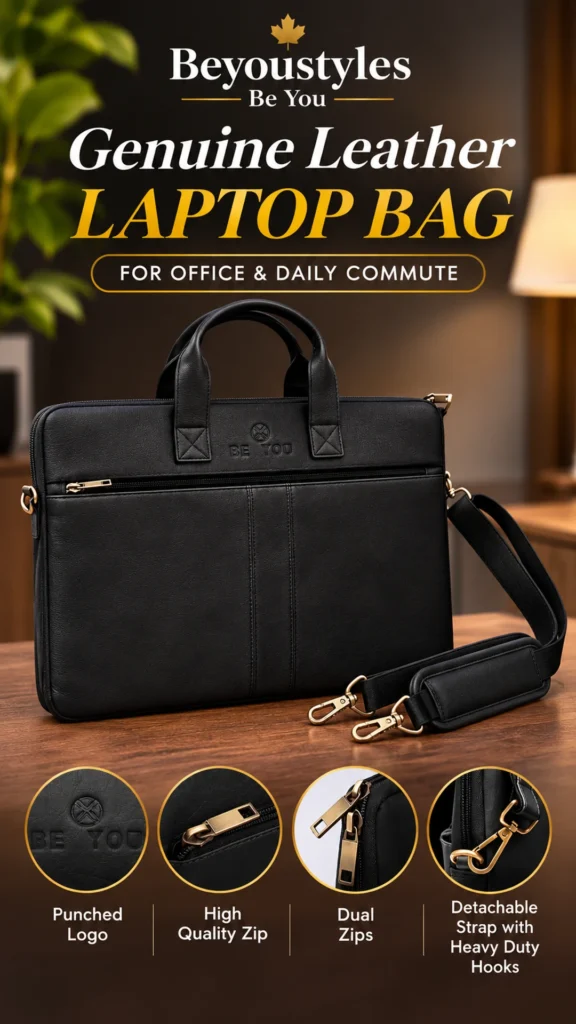
A practical leather laptop bag packing routine can make your daily journey from home to the office more organized, convenient and efficient. For professionals who drive to work, the ideal routine involves more than simply placing a laptop and charger inside a bag.
From preparing your work essentials at home to transporting them in your vehicle and arriving at your office desk, a consistent packing system helps reduce unnecessary clutter and forgotten accessories.
The Black Full-Grain Leather Laptop Bag from Beyoustyles provides two main storage compartments, a zippered interior pocket and a front quick-access compartment, offering a practical layout for everyday professional routines.
Why a Car-to-Office Packing Routine Matters
Driving to work gives professionals greater flexibility when transporting laptops, documents and office essentials. However, this convenience can sometimes encourage people to carry more than they actually need.
Over time, unnecessary cables, old documents, receipts and personal accessories can make a laptop bag heavier and less organized.
A consistent car-to-office packing routine helps you:
- Reduce unnecessary weight during your daily commute.
- Keep essential work equipment organized.
- Remember important documents and accessories.
- Move efficiently between your vehicle and workplace.
- Maintain a clean and professional appearance.
- Prepare quickly for unexpected meetings.
The goal is to create a repeatable system that works throughout the working week.
Step 1: Prepare Your Laptop Bag the Night Before
A smooth morning commute often begins the previous evening. Instead of rushing to collect your essentials before leaving home, spend a few minutes preparing your laptop bag in advance.
Review Your Next Working Day
Check your meeting schedule, appointments and planned office activities. Consider whether you need additional documents, presentation materials or specific accessories.
Remove Unnecessary Items
Empty old receipts, unused paperwork and accessories that are no longer required. Keeping your bag focused on the next working day helps maintain a streamlined profile.
Prepare Your Electronic Devices
Charge your laptop, wireless mouse and other necessary devices. Shut down or hibernate your laptop before packing it, following the device manufacturer’s recommendations.
Step 2: Follow a Practical Office Packing Checklist
Your leather laptop bag should contain the equipment you genuinely need for work rather than every accessory you own.
| Item | Priority | Purpose |
|---|---|---|
| Laptop | Essential | Daily work and meetings |
| Laptop charger | Essential if required | Device charging |
| Notebook and pen | Recommended | Meeting notes |
| Office identification | Essential if required | Workplace access |
| Business documents | As required | Appointments and presentations |
| Mouse and cables | Optional | Workstation convenience |
| Wallet and keys | Essential | Personal requirements |
If you already maintain a permanent charger and mouse at your office workstation, carrying duplicate accessories every day may not be necessary.
Step 3: Organize Your Leather Laptop Bag by Compartment
Assigning a consistent location to each item makes your work equipment easier to locate throughout the day.
First Main Compartment: Laptop
Place your closed laptop in one main compartment. Use a suitable protective sleeve if needed and if the available space accommodates it comfortably.
Avoid placing chargers, keys or other hard accessories directly against the laptop.
Second Main Compartment: Work Essentials
Reserve the second main compartment for selected work items such as documents, a notebook, charging accessories and a compact mouse.
Use a small accessory pouch when necessary to prevent loose cables from becoming tangled.
Interior Zipper Pocket: Small Personal Items
Use the interior zippered pocket for suitable small belongings that you do not need to access repeatedly throughout the day.
Front Compartment: Arrival Essentials
Keep your office access card, parking pass or a small notebook within easy reach, provided these items fit securely.
For a more detailed compartment arrangement, read our guide on how to pack a laptop and charger in a two-compartment leather bag.
Step 4: Transport Your Laptop Bag Safely in the Car
Daily vehicle transportation introduces different considerations compared with walking directly to work. Sudden braking, movement, sunlight and temperature changes can affect your bag and its contents.
Before beginning your journey, position the laptop bag in a secure location where it is unlikely to slide, fall or become a loose object during sudden braking.
- Keep the bag away from the driver’s footwell and vehicle controls.
- Avoid leaving the bag unsecured on a passenger seat.
- Secure it appropriately in a suitable storage area.
- Do not place heavy objects on top of the laptop bag.
- Keep drinks and potential sources of moisture separate.
- Avoid unnecessary exposure to direct sunlight.
A leather bag is not a substitute for impact-resistant protective equipment. Suitable device protection and secure vehicle storage remain important.
Step 5: Consider Canadian Summer and Winter Conditions
For professionals commuting in Canada, seasonal weather can introduce additional challenges when transporting laptops and leather accessories.
During Summer
Parked vehicles can become extremely hot, even during relatively short periods. Avoid leaving your laptop and leather bag inside a hot vehicle.
Prolonged heat exposure may affect electronic devices and contribute to changes in leather condition.
During Winter
Cold temperatures, snowfall and road moisture can also affect your everyday work equipment.
Bring your laptop bag indoors rather than storing it in a cold vehicle. If your laptop has become extremely cold, allow it to return to an appropriate operating temperature according to the manufacturer’s guidance before using it.
Remove surface moisture from leather gently and allow the bag to dry naturally, away from direct heat.
Step 6: Make Your Parking-to-Office Transition Easier
The short journey from your parked vehicle to the office entrance is an important part of your daily carrying routine.
Depending on your workplace, you may also need to carry a lunch bag, umbrella, coffee or additional documents.
A detachable shoulder strap gives you the option of freeing a hand when necessary, while traditional top handles are useful for shorter walks and professional settings.
Use the Top Handles When:
- Walking a short distance from the parking area.
- Entering a meeting room.
- Visiting clients or attending professional appointments.
- Carrying a manageable load for a short period.
Use the Shoulder Strap When:
- Walking through a larger parking facility.
- Carrying additional work essentials.
- Opening doors or using an office access card.
- Managing an umbrella during light rain.
Choose the carrying method according to your packed weight, comfort and walking distance.
Explore our guide to choosing a leather laptop bag with a shoulder strap for additional carrying considerations.
Step 7: Establish an Office Arrival Routine
Once you arrive at your workplace, a consistent unpacking routine can help you begin the working day with fewer distractions.
- Place your laptop bag on a stable, dry surface.
- Remove your laptop and connect it to your workstation.
- Take out the documents required for your first appointment.
- Return unused accessories to their assigned compartments.
- Keep your bag in a suitable location away from foot traffic.
Avoid completely emptying the bag unless necessary. Keeping unused items organized saves time when travelling between office departments or attending meetings.
Step 8: Keep Your Laptop Bag Meeting-Ready
Professionals often move between their main workstation, conference rooms and client appointments throughout the day.
A meeting-ready laptop bag should contain only what is required for the next task.
Before leaving your desk for a meeting, check whether you need:
- Your laptop or presentation device.
- A notebook and pen.
- Meeting-related documents.
- A suitable charging cable or adapter.
- Business cards, if relevant.
Rather than carrying unnecessary equipment from one room to another, adapt the contents of your bag to the meeting requirements.
This approach helps maintain a lighter carrying profile and a more organized professional appearance.
Step 9: Repack Your Laptop Bag Before Leaving the Office
At the end of the working day, take a few minutes to restore your original packing arrangement.
Confirm that all equipment you brought to work is accounted for. Remove unnecessary paperwork and separate anything that must remain at the office.
End-of-Day Checklist
- Laptop properly prepared for transportation.
- Necessary charger and accessories packed.
- Important documents collected.
- Personal belongings accounted for.
- Compartment closures checked.
- Shoulder strap and handles checked.
This simple habit helps prevent forgotten accessories and prepares your work bag for the following day.
Why a Black Full-Grain Leather Laptop Bag Works for Office Commuting
Black leather offers an understated appearance that complements business suits, dress shirts, chinos and smart-casual clothing.
For professionals who regularly move between their vehicle, office and client appointments, a structured black leather bag can provide a consistent professional appearance without requiring different bags for different occasions.
The Beyoustyles black model uses vegetable-tanned full-grain leather and offers a compartment layout designed around everyday work essentials.
Black Full-Grain Leather Laptop Bag Specifications
| Brand | Beyoustyles |
|---|---|
| Material | 100% Vegetable-Tanned Full-Grain Leather |
| Colour | Classic Black |
| Overall Dimensions | 40 × 29 × 4.5 cm |
| Main Compartments | 2 |
| Interior Storage | 1 Zipper Pocket |
| Exterior Storage | 1 Front Quick-Access Compartment |
| Carrying Options | Leather Handles and Detachable Shoulder Strap |
| Recommended Use | Office, Business, Commuting and Meetings |
Important: The listed measurements are overall bag dimensions, not confirmed internal laptop compartment dimensions. Measure your laptop, including any protective sleeve, before purchasing. A laptop’s advertised screen size alone does not confirm compatibility.
Common Car-to-Office Carry Mistakes
1. Leaving Your Laptop Bag Inside a Parked Vehicle
Besides increasing the possibility of theft, leaving your laptop inside a parked vehicle can expose it to unsuitable temperatures. Take your bag with you whenever practical.
2. Carrying Too Many Accessories
Unnecessary chargers, notebooks and electronic accessories increase carrying weight and may place pressure on the bag’s seams and closures.
3. Keeping Drinks Beside Electronic Equipment
Carry coffee, water bottles and other liquids separately to reduce the risk of spills affecting your laptop, documents or leather.
4. Packing the Bag Differently Every Day
Constantly changing the location of essential items makes them harder to find. Establish designated storage locations and maintain them consistently.
5. Forcing an Overfilled Bag to Close
If your bag cannot close comfortably, remove unnecessary items. Forcing closures can place excessive pressure on the contents and hardware.
Maintain Your Leather Laptop Bag Through Daily Use
Regular commuting exposes a leather bag to dust, moisture and repeated handling. Simple maintenance habits can help preserve its appearance and functionality.
- Remove unnecessary items at the end of the working week.
- Wipe away surface dust using a soft cloth.
- Keep the leather away from excessive moisture and heat.
- Inspect strap attachments and carrying handles periodically.
- Follow the manufacturer’s leather conditioning guidance.
- Store the bag in a cool, dry location when not in use.
For further maintenance tips, read our guide on how to care for a leather laptop bag.
Choose the Right Leather Laptop Bag for Your Daily Routine
Every professional has different carrying requirements. Some need a compact setup for a laptop and a few documents, while others require additional space for equipment and accessories.
Consider your laptop dimensions, daily workload, walking distance and preferred carrying method before selecting a bag.
Explore the complete Beyoustyles collection of Genuine Leather Laptop Bags to compare classic leather finishes and professional work bag designs.
Upgrade Your Car-to-Office Carry with Beyoustyles
A consistent packing routine becomes easier when your laptop bag supports practical organization and professional carrying options.
With its classic black finish, full-grain leather construction and organized storage layout, the Beyoustyles black laptop bag is designed to complement everyday office routines.
Discover the Black Full-Grain Leather Laptop Bag for Office and Daily Commuting and create a more organized professional carrying routine.
Frequently Asked Questions
What should I pack in a laptop bag for the office?
Carry your laptop, necessary charger, office identification, notebook, pen and required documents. Additional accessories should depend on your working schedule.
Where should I place my laptop bag in the car?
Choose a suitable, secure storage location that prevents unnecessary movement during transportation. Keep the bag away from driving controls and avoid leaving it unsecured on a seat.
Can I leave a leather laptop bag in my car during summer?
It is best to avoid leaving leather bags and electronic equipment in hot parked vehicles. Excessive heat may affect electronic components and leather condition.
Is a black leather laptop bag suitable for daily office commuting?
Yes. Black leather provides versatile professional styling, while a suitable compartment arrangement and carrying system can support everyday office requirements.
Should I use handles or a shoulder strap when walking from the car to the office?
Handles work well for short distances and manageable loads. A shoulder strap can be convenient when carrying additional items or walking farther.
Will a 17-inch laptop fit inside the Beyoustyles black laptop bag?
Compatibility cannot be confirmed from screen size alone. Compare the complete dimensions of your device with the usable internal bag dimensions before purchasing.
How can I keep my laptop bag organized throughout the week?
Assign consistent locations to your essential items, remove unnecessary paperwork regularly and restore your packing arrangement at the end of each working day.
Final Thoughts
A practical leather laptop bag packing routine can simplify the transition between home, your vehicle and your workplace. By preparing essentials in advance, organizing storage compartments and transporting your equipment responsibly, you can create a more efficient daily commuting experience.
Focus on carrying what you genuinely need, maintaining your professional accessories and developing consistent habits that support your working day.


