
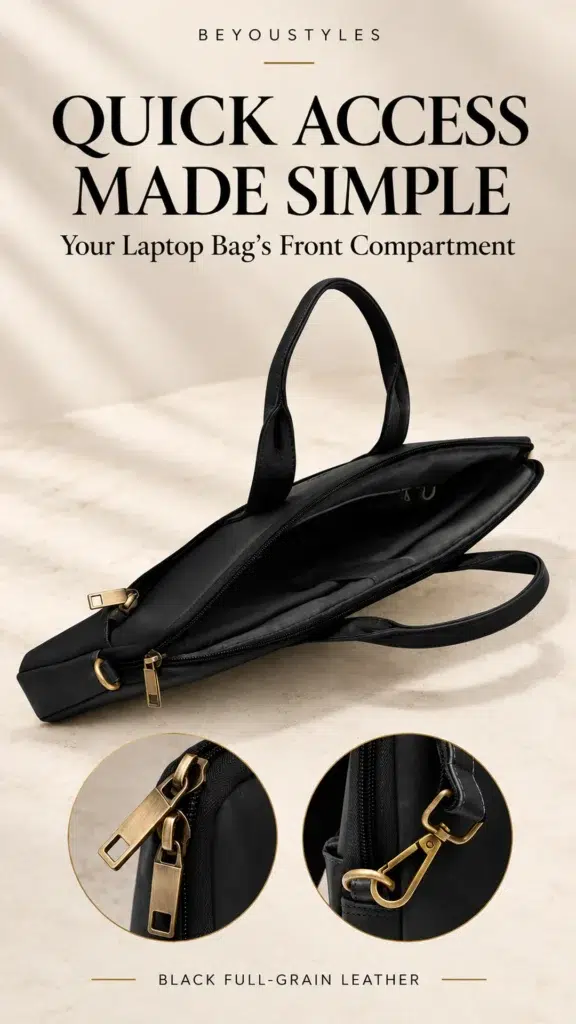
The Black Full-Grain Leather Laptop Bag by Beyoustyles includes a large exterior quick-access front compartment. Here is a practical way to use that space for commuting, meetings and everyday work, while keeping the rest of the bag organised.
Give the Front Compartment One Clear Job
Treat the front section as the place for a small number of items you reach for often. It works best when you know what belongs there before you open it. That might be a slim notebook for meetings, a frequently used cable or a document you need at your next stop.
A simple rule helps: pack for the next part of your day rather than every possible situation. If an item is rarely used, it probably does not need the easiest position to reach.
This also keeps the front compartment distinct from the main storage. You can retrieve a small everyday item without shifting larger belongings each time.
What to Put in a Quick-Access Front Compartment
Choose items according to their size, how often you use them and how comfortably they fit. The suggestions below are a packing approach, not a promise that every notebook, charger or document holder will fit the featured bag’s front section.
| Item | Why keep it accessible? | Packing check |
|---|---|---|
| Slim notebook | Useful for a quick note or meeting reminder | Check the pocket opening and notebook dimensions |
| Frequently used cable | Easy to retrieve at your desk | Secure it with a reusable tie or small pouch |
| Non-sensitive paperwork | Ready for your next appointment | Use a slim folder if it fits without bending |
| Capped pen in a case | Available when you need to write | Keep ink and sharp parts away from the lining |
| Small everyday accessory | Prevents repeated searching in the main section | Avoid loose items that catch or scratch |
Start with two or three essentials. Add another item only if it remains easy to see and retrieve everything already inside.
What to Keep in Other Compartments
Your Laptop
Do not treat the front pocket as a laptop sleeve. Check the intended storage area, internal measurements and any protection you need for your device. The overall dimensions of a bag do not tell you the usable dimensions of each compartment.
Bulky Accessories
A large charger or several adapters may make the front section bulge. If an accessory presses against the pocket or makes access awkward, move it to a more suitable section in a pouch. Avoid forcing the closure around an oversized load.
Valuables and Sensitive Documents
Quick access and secure storage are different needs. For valuables, assess the closure, carrying position and surroundings rather than assuming that an exterior pocket offers theft protection. The featured bag includes an interior zipper pocket, but no pocket should be described as theft-proof.
Keep confidential papers in an appropriate holder and choose their location according to the level of privacy your work requires. Use the front section for convenience only when the contents and circumstances suit it.
How the Black Full-Grain Bag’s Layout Supports Organisation
The Beyoustyles listing describes two main compartments, one interior zipper pocket and a large front compartment. That layout lets you assign different purposes to different sections instead of carrying everything together.
- Main storage: plan space for your device and larger work items after checking fit.
- Interior zip pocket: consider smaller belongings you prefer to keep enclosed inside.
- Front compartment: reserve it for the few items you use repeatedly.
For a broader explanation of storage layouts, read our guide to leather laptop bag compartments. Use that guidance alongside the specifications of the individual bag you plan to buy.
A Simple Morning Packing Routine
- Empty the front section. Remove yesterday’s receipts, wrappers and unused items.
- Check your next stop. Decide what you will need during the commute or first appointment.
- Group small accessories. Put a cable or pen into a slim holder rather than leaving it loose.
- Load without pressure. Keep contents flat where possible and avoid stretching the compartment.
- Check the closure. Make sure it operates normally and nothing is caught.
- Try retrieving an item. If you have to remove several things first, simplify the load.
At the end of the day, put temporary items back where they belong. A front compartment stays useful when it is reset regularly.
Adapt the Contents to Your Workday
For the Daily Commute
Choose the few things you actually need while travelling, such as a small notebook or a cable you use on arrival. Keep the bag attended and close the compartment after use. Avoid standing in a busy walkway while searching through it.
For Meetings
Prepare a slim notebook and a capped pen in a case. Put appointment paperwork in a suitable folder if the dimensions allow it. Removing unrelated items beforehand makes it easier to find what you need at the table.
For Business Travel
Review your packing for each stage of the trip. An item needed during transit may not need to remain in the front pocket once you reach your destination. Keep travel documents and valuables in a location appropriate to your surroundings and security needs.
If you are comparing work-bag features more generally, see our guide to leather laptop bags for office and business travel.
Check These Details Before Buying
If quick-access storage matters to you, ask for the front compartment’s usable dimensions and opening size. Compare them with the notebook, pouch or document holder you intend to carry. Check the closure design in the current photographs or request clarification.
The black bag’s published overall size is 40 × 29 × 4.5 cm. Those figures are not internal pocket measurements and do not establish compatibility with every laptop of a particular screen size. Measure your actual device, including any sleeve, before confirming fit.
Review the available photographs, current availability and product information before ordering. A useful compartment is one that works with your everyday contents, not simply one described as large.
Keep the Front Compartment Clean and Uncluttered
Empty small debris regularly and check for uncapped pens or sharp accessories. Follow the seller’s care instructions for the leather and lining, and avoid applying cleaning products inside the pocket without suitable guidance.
If something catches in the closure, remove the obstruction gently rather than forcing it. For more maintenance guidance, read how to care for a leather laptop bag.
Choose a Bag That Fits Your Daily Routine
A front compartment is most useful when it has a small, predictable set of contents. Give each section of your bag a purpose, check that your essentials fit comfortably and review the load when your plans change.
View the Black Full-Grain Leather Laptop Bag and its compartment details to assess it for your routine. You can also browse the Leather Laptop Bags collection to compare available designs.
Frequently Asked Questions
What should I keep in my laptop bag’s front compartment?
Choose a few frequently used items that fit comfortably, such as a slim notebook, a secured cable or non-sensitive paperwork. Avoid packing so much that access becomes awkward.
Does the Beyoustyles black leather laptop bag have a front compartment?
Yes. Its listing specifies a large exterior quick-access front compartment, alongside two main compartments and an interior zipper pocket.
Can I put a laptop in the front compartment?
Do not assume it is intended for a laptop. Confirm the storage arrangement, internal measurements and protection required for your device before choosing where to carry it.
Is the front compartment theft-proof?
No theft-proof feature is established by the listing. Choose where to carry valuables according to the closure, surroundings and your security needs.
Will the bag fit any 15-inch or 17-inch laptop?
Screen size alone cannot confirm fit. Compare your laptop’s physical dimensions with the usable internal compartment measurements, including space for any sleeve.


