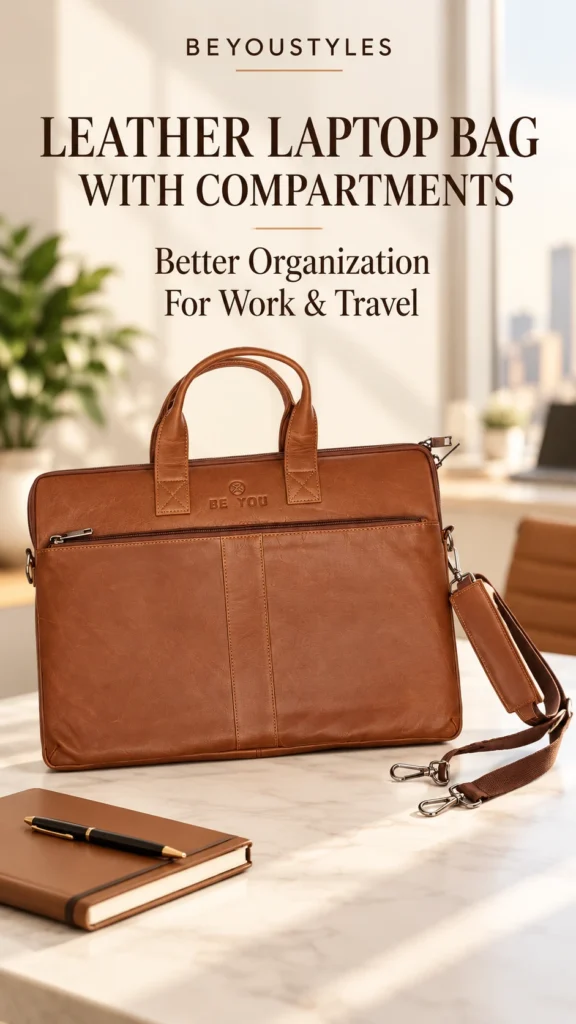
Why Compartment Layout Matters More Than Pocket Count
More pockets do not automatically mean better organization. A small pocket that cannot hold your charger may be less useful than a roomy section that accommodates an accessory pouch. The layout needs to match the things you actually carry.
Start by laying out your normal work essentials. Group them into devices, documents, accessories and items you reach for frequently. Then ask whether each group has a sensible place in the bag without forcing the closures.
Keep the items you use daily in predictable locations. Consistency is what makes a compartment system useful: you should be able to find your charger without unpacking your entire bag.
The Beyoustyles Black Full-Grain Bag: Listed Storage Features
The current product listing specifies 100% vegetable-tanned full-grain leather, reinforced leather handles and a detachable leather shoulder strap. Its listed dimensions are 40 × 29 × 4.5 cm.
| Listed Section | Suggested Role | What to Check |
|---|---|---|
| First main compartment | Computer storage, if the dimensions suit your device | Usable internal space, opening width and any sleeve you intend to use |
| Second main compartment | Documents, a notebook or an accessory pouch | Whether your complete load fits without pressure |
| Interior zipper pocket | Small items you want enclosed | Pocket dimensions and closure |
| Front compartment | Frequently used items that fit comfortably | Access, closure and suitability for the contents |
These are packing suggestions, rather than additional product specifications. The listing does not provide internal compartment dimensions or confirm a padded laptop sleeve. Ask for those details if they are important to your purchase.
Create Four Storage Zones for Your Working Day
1. Give Your Laptop a Clear Space
Choose a section that allows easy insertion and removal without forcing the computer through the opening. Keep loose keys and other hard accessories away from its surface.
If you use a protective sleeve, include its thickness when checking fit. Separation can help organize your contents, but a divider alone does not establish impact protection.
2. Keep Documents Together
Use a slim folder for loose paperwork and place it with your notebook. This makes it easier to move meeting materials from the bag to your desk as one group.
Check the folder’s size as well as the paper size. A folder can be wider or taller than the documents it contains. Avoid squeezing paperwork beside a bulky charger if you want it to remain flat.
3. Group Cables and Accessories
A compact pouch can bring your charger, cable adapters and mouse together. It also lets you move those items between your work bag and desk without searching for each separately.
Pack only the accessories you expect to use. Duplicated cables and unused adapters take up space that could otherwise make access easier.
4. Reserve an Access Area
Choose a suitable pocket for the items you retrieve often, such as earphones or a small notebook. Keep sensitive items in an appropriately closed section and stay aware of the bag when travelling.
A quick-access pocket is useful for convenience, but it should not be treated as a theft-proof storage feature.
Check Laptop Dimensions Before Choosing a 15-Inch or 17-Inch Bag
Laptop screen size is a diagonal measurement. It does not describe the full width, depth or thickness of the closed computer. Devices with similar screen sizes can therefore need different amounts of space.
Measure your closed laptop and compare it with the usable internal compartment dimensions. Include any sleeve or case you use. Also check that the opening is large enough to insert the device comfortably.
The Black Full-Grain bag’s listed overall size should not be treated as its internal capacity. Do not assume that a 17-inch laptop will fit without confirmation for your particular device.
For related sizing considerations, read our 15-inch leather laptop bag buying guide. Use actual device measurements as the basis for your final choice.
A Simple Packing Routine for Office Use
- Start with your computer. Position it in the section you have checked for fit.
- Add your meeting materials. Keep your notebook and document folder together.
- Add your accessory pouch. Place it where it does not press awkwardly against the laptop.
- Assign small items a pocket. Use the same locations each day.
- Close the bag gently. If you must force the closure, reduce or rearrange the contents.
Before leaving, check that you have the charger and documents you need for that day’s work. A short, repeatable check is easier than carrying everything just in case.
Adapt the Layout for Work and Travel
For an office commute, keep the contents focused on your normal working day. For a meeting away from the office, add only the presentation accessories or papers that the meeting requires.
For travel, arrange items in the order you expect to need them. Keep your booking information and necessary documents accessible while choosing enclosed storage where appropriate. Follow the instructions given at security checks.
If you also carry a suitcase, decide which bag will hold each item before packing. Keeping work equipment together can make it easier to set up at your destination without opening multiple bags.
Consider the Whole Bag Alongside Its Compartments
Interior layout is one part of the buying decision. Examine the handles, shoulder-strap attachments, closures and lining as well. Think about how the loaded bag will feel during the journeys you normally make.
A useful test is to consider your busiest ordinary day rather than an unusually light or unusually heavy one. Choose storage that suits that routine, then remove items you rarely use.
For a separate discussion of materials, read our guide to full-grain leather laptop bag quality. Compare the material description alongside the practical storage layout.
Common Organization Mistakes to Avoid
- Buying by pocket count alone: Check whether the sections fit your belongings.
- Using screen size as the only measurement: Compare the actual device and internal space.
- Mixing loose accessories with your laptop: Give hard items a separate place.
- Overfilling the front pocket: Keep access easy and avoid forcing the closure.
- Changing storage locations every day: A consistent layout makes items easier to find.
- Assuming organization means padding: Confirm protective features separately.
Choose Compartments That Match Your Routine
The most useful leather work bag is one whose storage makes sense for your laptop, documents and daily accessories. Plan your packing layout, confirm fit and leave enough room to use each section comfortably.
Explore the Beyoustyles Leather Laptop Bags collection to compare available designs.
If you prefer a black professional style, review the Black Full-Grain Leather Laptop Bag. Its listed compartment layout gives you a starting point for organizing your work essentials; confirm the internal measurements for your device before ordering.
Frequently Asked Questions
How many compartments should a leather laptop bag have?
Choose according to what you carry. Separate space for your computer, paperwork and smaller items can be useful, but section size and accessibility matter more than a fixed pocket count.
What compartments does the Beyoustyles Black Full-Grain bag have?
The listing specifies two main compartments, one interior zipper pocket and one large front compartment.
Does this bag have a padded laptop compartment?
Padding is not confirmed in the current product description. Ask Beyoustyles for details before relying on the bag for a particular level of device protection.
Will a 17-inch laptop fit?
Compatibility is not established by the listed overall dimensions. Compare your device, including any sleeve, with the usable internal measurements and opening size.
Can I carry a laptop and documents together?
Yes, if both fit comfortably within the available sections. A separate folder helps keep papers together; avoid packing so tightly that items press against the computer or closures.