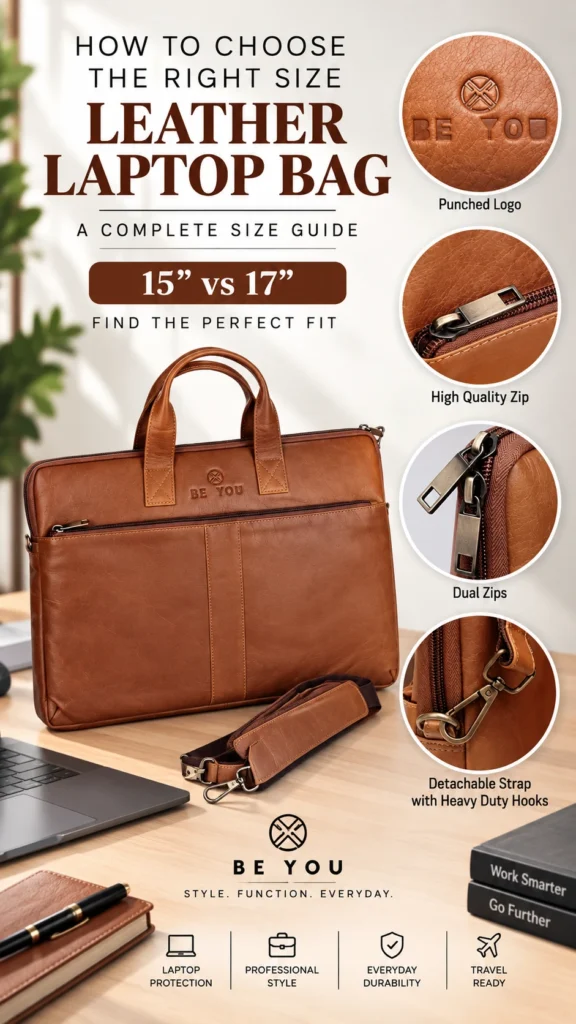
Choosing a leather laptop bag is not only about colour, leather quality or style. The most important starting point is fit. A bag that is too small may put unnecessary pressure on your laptop and the bag itself, while an oversized compartment may allow the device to move around more than necessary.
This laptop bag size guide explains how to measure your laptop correctly, understand the difference between laptop screen size and actual device dimensions, and decide whether a 15-inch or 17-inch leather laptop bag is right for you.
If you carry a standard work laptop, a 15-inch leather laptop bag can provide a practical balance between device protection, professional appearance and everyday portability.
Why Choosing the Correct Laptop Bag Size Matters
Your laptop is usually one of the most valuable items inside your work bag. Choosing an appropriate fit helps keep the device properly positioned while you commute, travel or move between meetings.
A correctly sized leather laptop bag should provide enough room for the laptop without forcing it into the compartment.
At the same time, you generally do not want excessive unused space around the computer.
The right size can provide:
- A more secure laptop fit
- Better organization
- More practical everyday carrying
- Reduced unnecessary movement inside the bag
- Enough space for your normal work accessories
- A cleaner and more professional bag profile
What Does 15-Inch or 17-Inch Laptop Actually Mean?
This is one of the most important points to understand before buying a laptop bag.
A laptop described as 15-inch or 17-inch is generally being classified by its screen size. That number does not automatically tell you the laptop’s complete exterior width, height or thickness.
Two laptops sold within the same screen-size category can have different external dimensions because manufacturers use different:
- Screen bezels
- Chassis designs
- Keyboard layouts
- Hinges
- Cooling systems
- Device thicknesses
Therefore, do not buy a laptop bag based only on the number printed in your laptop’s product name.
How to Measure a Laptop for a Bag
Before ordering a leather laptop bag, measure the actual laptop itself.
You need three measurements:
- Width
- Height or depth
- Thickness
Step 1: Measure the Laptop Width
Close your laptop and place it on a flat surface.
Measure horizontally from the far-left edge to the far-right edge of the laptop body.
Do not measure only the visible screen.
Step 2: Measure the Laptop Height
Measure from the front edge of the closed laptop to the back edge near the hinge.
This measurement may also be described as the laptop’s depth depending on the manufacturer.
Step 3: Measure the Laptop Thickness
With the laptop closed, measure its thickness from the bottom surface to the highest point of the closed device.
Make sure any permanent feet or structural projections are taken into account where relevant.
Step 4: Compare With the Bag’s Internal Laptop Compartment
Now compare your three laptop measurements with the usable internal dimensions of the laptop compartment.
Do not compare only with the exterior dimensions of the bag.
The laptop needs to fit inside the actual compartment intended to hold it.
Laptop Screen Size vs Actual Laptop Dimensions
This distinction prevents one of the most common laptop-bag buying mistakes.
| Measurement | What It Tells You |
|---|---|
| Screen size | The diagonal size classification of the display |
| Laptop width | The device’s actual side-to-side exterior measurement |
| Laptop height/depth | The device’s actual front-to-back measurement |
| Laptop thickness | How thick the closed laptop body is |
| Bag compartment dimensions | The usable space available for the laptop |
For the most reliable fit, compare the laptop’s actual dimensions with the dimensions specified for the bag or its laptop compartment.
15-Inch Leather Laptop Bag: Who Is It Best For?
A 15-inch leather laptop bag is a practical option for many professionals carrying standard work laptops.
It can be particularly suitable if you:
- Carry a laptop in the common 15-inch range
- Commute to work regularly
- Prefer a balanced professional profile
- Carry a charger and a moderate number of accessories
- Attend meetings or client visits
- Do not require excessive additional storage
A correctly fitted 15-inch bag can offer enough room for your computer and everyday essentials without requiring the larger footprint of a 17-inch bag.
For more specific buying considerations, see our 15-Inch Leather Laptop Bag guide.
17-Inch Leather Laptop Bag: Who Needs the Extra Space?
A 17-inch leather laptop bag is designed for users who carry larger laptops or need greater overall capacity.
A larger bag may make sense if you:
- Use a large 17-inch laptop
- Carry a mobile workstation
- Need more room for documents
- Carry chargers, cables and additional technology
- Travel with multiple work accessories
- Prefer greater storage capacity
If your laptop and everyday workload require additional room, a 17-inch leather laptop bag may be the more appropriate choice.
Remember that extra capacity can also mean a larger bag and potentially more total carrying weight once it is fully packed.
15-Inch vs 17-Inch Leather Laptop Bag
| Feature | 15-Inch Laptop Bag | 17-Inch Laptop Bag |
|---|---|---|
| Laptop type | Standard work laptops | Larger laptops/workstations |
| Overall bag profile | More compact | Larger |
| Accessory capacity | Moderate | Greater |
| Daily commuting | Convenient for many users | Best when larger capacity is required |
| Potential packed weight | Generally lower | Can be higher |
| Best choice for | Standard laptop + daily essentials | Large laptop + additional work gear |
Should You Buy a Larger Laptop Bag for Extra Space?
Not automatically.
Buying the largest available bag simply because it provides more space can lead to unnecessary bulk.
Instead, think about what you genuinely carry every day.
For example:
- Laptop
- Laptop charger
- Mouse
- Notebook
- Documents
- Phone
- Wallet
- Power bank
- Pens
- Cables or adapters
If these items fit comfortably in a properly sized 15-inch bag, moving to a 17-inch bag simply for unused capacity may not provide much benefit.
On the other hand, professionals who carry larger devices, substantial documents or additional equipment may genuinely benefit from the extra room.
Don’t Forget About Laptop Bag Compartments
Correct size is only part of a good fit.
A well-organized bag separates your computer from chargers, documents and smaller accessories.
Useful features can include:
- Dedicated laptop compartment
- Document section
- Interior zipper pocket
- Accessory pockets
- Phone storage
- Pen holders
- Quick-access exterior pocket
Read our guide to leather laptop bag compartments to understand how internal organization affects everyday usability.
How Much Extra Room Should a Laptop Bag Have?
The goal is a secure, practical fit—not a compartment that requires you to force the laptop inside and not one that leaves the computer moving freely around a large empty space.
Allow enough room for the laptop to enter and leave the compartment normally while taking the bag’s padding and construction into account.
Because bag designs and laptop shapes vary, use the manufacturer’s stated internal measurements rather than relying on a universal allowance.
Should the Laptop Fit Tightly Inside the Bag?
No laptop should need to be forced into its compartment.
An excessively tight fit can make insertion and removal inconvenient and may place unnecessary pressure on the surrounding material, zipper or seams.
At the other extreme, a significantly oversized compartment may allow excessive movement.
The objective is a secure fit with enough usable clearance for normal handling.
Measure the Laptop, Not Your Old Laptop Bag
If you are replacing an existing bag, measure your current laptop rather than simply ordering another bag based on the dimensions of the old one.
Your previous bag may have had different padding, compartment construction or usable interior dimensions.
Actual laptop measurements give you a much better starting point.
Consider Your Daily Work Routine
Two people with laptops of similar dimensions can still need different bags.
Office Commuter
A commuter may prioritize a compact profile, organized storage and comfortable carrying.
Business Traveller
A frequent traveller may require additional space for chargers, documents, cables and other work essentials.
Executive or Client-Facing Professional
A structured leather laptop bag can provide the organization required for work while maintaining a professional appearance for meetings.
Large-Laptop User
Someone carrying a 17-inch workstation should prioritize verified device fit before considering other features.
Why Leather Quality Still Matters After Choosing the Size
Once you know the correct size, look at material and construction.
Full-grain leather is valued for retaining the natural grain surface and developing character with use. For a professional bag carried regularly, construction quality also matters around high-stress areas such as:
- Handles
- Shoulder-strap attachments
- Bottom corners
- Zippers
- Seams
- Laptop compartment
Size alone cannot make a poor-quality bag suitable for long-term professional use.
Check Carrying Comfort Before Choosing More Capacity
A larger bag encourages you to carry more.
Before choosing extra capacity, consider whether you actually need it. Your laptop, charger, documents and accessories can create substantial total weight.
Features such as strong handles, an adjustable shoulder strap and balanced internal organization can make regular carrying more practical.
Common Laptop Bag Sizing Mistakes
Avoid these common mistakes when selecting your next bag:
- Buying based only on advertised screen size
- Not measuring the laptop’s actual width
- Ignoring laptop thickness
- Comparing the laptop with exterior bag dimensions instead of usable compartment dimensions
- Assuming every 15-inch laptop has identical dimensions
- Buying a 17-inch bag only because bigger seems better
- Forgetting about chargers and work accessories
- Ignoring compartment organization
- Overlooking the weight of a fully packed bag
Quick Laptop Bag Size Checklist
Before ordering, use this checklist:
- Confirm your laptop model.
- Close the laptop.
- Measure its actual width.
- Measure its height/depth.
- Measure its thickness.
- Check the bag’s usable laptop-compartment dimensions.
- Consider the accessories you carry every day.
- Decide whether 15-inch or 17-inch capacity best suits your needs.
- Check compartment organization.
- Consider your daily commute and carrying comfort.
Explore Beyoustyles Leather Laptop Bags
Beyoustyles offers genuine leather laptop bags designed for professional use, including options for common 15-inch and 17-inch laptops.
When comparing bags, start with device fit and then consider storage, leather quality, organization, carrying options and your everyday work routine.
For a broader overview beyond sizing, read our complete guide to choosing the right leather laptop bag.
Frequently Asked Questions
What size laptop bag do I need?
Measure your laptop’s actual width, height/depth and thickness, then compare those measurements with the usable internal dimensions of the bag’s laptop compartment. Do not rely only on screen size.
Will a 15-inch laptop fit every 15-inch laptop bag?
Not necessarily. Different laptop models with the same advertised screen size can have different exterior dimensions. Always compare the actual device dimensions with the bag specifications.
Can I put a 15-inch laptop in a 17-inch bag?
Physical compatibility depends on the individual bag and its laptop compartment. A larger compartment may provide more space than necessary, so check whether the device will be held securely rather than assuming that a larger bag is automatically better.
How do I measure my laptop for a bag?
Close the laptop and measure its full exterior width, front-to-back height/depth and thickness. Compare all three measurements with the bag’s usable laptop compartment.
Is a 17-inch leather laptop bag better than a 15-inch bag?
Neither size is universally better. A 15-inch bag is appropriate for many standard work laptops and can provide a more compact profile. A 17-inch bag is more appropriate for larger devices or users who genuinely require additional capacity.
Should I buy a laptop bag one size bigger?
Not automatically. Choose according to your laptop’s actual dimensions and the bag’s internal compartment measurements. Extra size is useful only when you need the additional capacity and the laptop remains properly positioned.
Does laptop thickness matter when buying a bag?
Yes. Width and height are not the only relevant measurements. Thicker laptops may require more compartment depth, so laptop thickness should also be checked before purchase.
Final Thoughts
The most important lesson from this laptop bag size guide is simple: measure your laptop before buying the bag.
Do not assume that every laptop advertised as 15-inch or 17-inch has identical exterior dimensions. Measure the device’s width, height/depth and thickness and compare those figures with the usable laptop compartment.
Choose a 15-inch bag when it properly fits your standard work laptop and daily essentials. Choose a 17-inch bag when your larger device or work routine genuinely requires the additional capacity.
Once the fit is right, you can then compare full-grain leather, compartments, hardware, carrying comfort and professional styling to find a leather laptop bag suited to your everyday work.