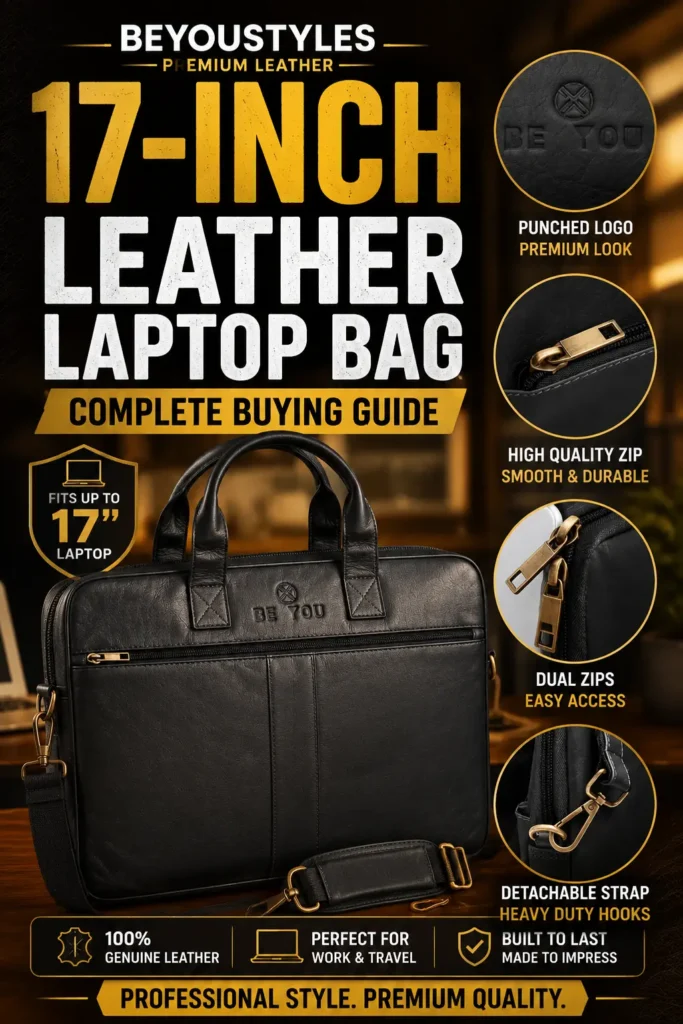
Choosing a 17 inch leather laptop bag starts with one practical question: will your actual computer fit comfortably inside the protected storage area? A large screen label is useful, but it does not tell you the device’s full width, depth or thickness.
A work bag also needs room for the charger, documents and accessories you carry every day. If those items press against your laptop or make the bag awkward to lift, extra capacity has not solved the problem.
This guide focuses on buying checks for larger laptops: usable dimensions, protective construction, carrying comfort and realistic storage. You can browse the Beyoustyles Leather Laptop Bags collection while comparing each product’s specifications with your device and work routine.
Measure Your Laptop Before Choosing the Bag
The “17-inch” description usually refers to the screen’s diagonal measurement. It is not the width of the computer. Two laptops with the same screen diagonal can have different bodies because of bezel size, chassis design and thickness.
Measure your closed laptop’s width, depth and thickness, including any feet or protrusions that affect its fit. If you carry it inside a protective sleeve, measure the sleeved device as well.
Then compare those figures with the bag’s usable internal laptop-compartment dimensions. Overall bag dimensions are insufficient: leather panels, lining, dividers and padding reduce the space available inside.
Check the opening too. A device can theoretically fit within a compartment yet be difficult to insert through a narrow zipper opening. Ask for confirmation when the listing gives only exterior measurements.
What Fit Should You Aim For?
Your laptop should slide into its intended space without forcing the corners or straining the closure. Once inside, it should not move freely around the bag. A protective sleeve or retaining feature can help, provided it does not make the fit too tight.
Do not choose a fixed clearance allowance without considering the compartment design. Padding thickness, the shape of the opening and a sleeve all affect the space needed. The useful test is whether the device fits securely with the bag closing normally.
| Buying check | What to confirm |
|---|---|
| Laptop dimensions | Actual closed-device width, depth and thickness. |
| Usable compartment | Internal dimensions after allowing for lining and padding. |
| Opening | Enough space to insert the device without forcing it. |
| Protective sleeve | Whether the laptop still fits when sleeved. |
| Closure | Zippers or fastenings close without pressure from the laptop. |
| Loaded bag | Charger and other essentials fit without pressing against the device. |
Check Protection Separately from Leather Quality
Full-grain leather and laptop protection are different buying considerations. A leather exterior does not establish that the bag has a padded device compartment, reinforced base or impact-tested construction.
Look for a clearly described protective section. Check the base and corners, not just the broad side panels. A compartment that holds the laptop above the bottom of the bag can reduce direct contact when the bag is set down, but its effectiveness depends on construction.
Keep chargers, plugs and hard accessories away from the laptop surface. Do not rely on a thin divider to prevent a heavily packed object from pressing against the screen housing.
For a closer look at storage layouts, read our existing guide to leather laptop bag compartments. Use it alongside the actual product photographs and specifications.
Plan for the Charger and Your Full Workday Load
Larger laptops can come with substantial chargers. Before buying, lay out the computer, charger, cables, notebook, documents and other items you expect to carry. This makes your capacity needs more concrete than simply choosing the largest bag available.
A wide bag with limited depth may fit a computer and flat documents but leave little room for bulky accessories. Multiple compartments are useful only when their usable dimensions match your items.
Avoid overpacking. The closure should work smoothly, the panels should not bulge heavily and the handles should feel secure. Carrying less can improve convenience more than adding another pocket.
Assess Carrying Comfort with the Bag Loaded
Ask for the empty bag weight if it is not listed. Add your laptop and typical accessories to understand the weight you will actually carry. A premium material description cannot tell you whether that load will feel comfortable during your commute.
Check handle shape, attachment points and shoulder-strap adjustment. If a shoulder pad is included, inspect whether it stays where you need it. Confirm that the strap length works with your preferred carrying position and clothing.
Try the bag under a realistic load where possible. A comfortable empty bag may feel different after you add a large laptop and charger. For longer journeys, consider whether your routine calls for another carrying format or reduced contents.
What to Look for in Full-Grain Leather Construction
Full-grain describes leather that retains its grain surface. The term is useful, but it does not by itself establish the quality of the finished bag. Leather selection, thickness, finishing, stitching and hardware all influence performance.
Inspect seams for even stitching and secure finishing. Pay particular attention to handle and strap attachments because they support the loaded bag. Check that metal fittings operate smoothly and that the zipper does not catch against the lining.
Natural grain and colour variation can be part of leather’s appearance. Choose a finish you enjoy, while checking how the seller recommends cleaning and conditioning it. Do not assume every leather finish should receive the same treatment.
Professional Appearance Without Unnecessary Bulk
A large work bag can look neat when its proportions suit the contents. Choose a colour and finish that works with your usual work clothes, then prioritise a layout that closes comfortably when packed.
Consider how you will use it in meetings and shared workspaces. Easy access to a notebook or documents can be helpful, but an exterior pocket should not become so full that it distorts the bag.
For broader workplace styling and use, see our article on leather laptop bags for office use. The key buying decision here remains whether the bag accommodates your larger computer and daily load.
Confirm Product Compatibility Before Ordering
If you need a 17-inch leather laptop bag, ask the seller to confirm fit using your laptop model and dimensions. A statement that a bag is suitable for laptops or work essentials is not enough to establish compatibility with every large device.
Request the internal device-compartment measurements, information about padding and the empty weight if those details are missing. Check the return terms before purchase so you understand your options if the fit is unsuitable.
For Beyoustyles products, compare the published measurements carefully and obtain confirmation of 17-inch compatibility before treating any design as the correct fit. A clear specification is more useful than an assumption based on the product name.
Frequently Asked Questions
Will any 17-inch laptop fit a bag labelled 17-inch?
Not necessarily. Screen size does not establish the computer’s external dimensions. Compare your device with the usable internal compartment and opening.
Can I use a smaller bag if the laptop fits diagonally?
Diagonal placement may prevent the device from sitting in its intended protected section or strain the closure. Choose a bag that accommodates the laptop properly rather than forcing an improvised fit.
Does full-grain leather mean the laptop compartment is padded?
No. Leather grade describes the material, while padding is a separate construction feature. Check the product specification for both.
Should I use a laptop sleeve inside a leather bag?
A suitable sleeve can provide additional separation and cushioning. Check the dimensions with the sleeve included and avoid making the compartment too tight.
Is a leather laptop bag waterproof?
Do not assume it is. Check any stated water-resistance specification and protect the bag and electronics from rain as appropriate.
Choose Around Your Actual Laptop and Load
The right 17 inch leather laptop bag should accommodate your computer securely, organise your essentials and remain manageable when loaded. Confirm the internal fit first, then assess protective construction, weight and workmanship. Those checks help you choose a large work bag with confidence.